01
Install from the Marketplace
Download HoYo Deck from the Elgato Marketplace. It's free and installs in seconds.


Track resin, Trailblaze Power, battery charge, banners, daily rewards, and endgame resets without opening another tab.
Live resin, Trailblaze Power, and battery charge
Banner timers, endgame rotations, and daily rewards
Built for Stream Deck keys, dials, and Stream Deck+
At a glance
Keep your farming loop, banner timing, and endgame rotation visible on desk hardware that already belongs in your setup.

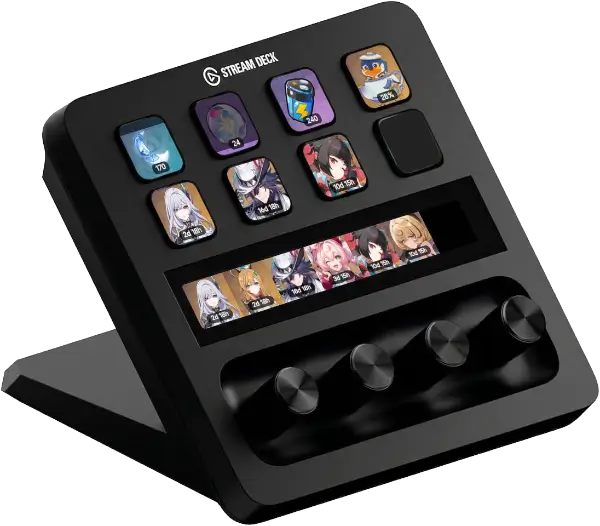
Actions
HoYo Deck now runs on common action layer across all supported games. Genshin keeps small set of dedicated extras.
Shared core actions
One unified stamina key for Resin, Trailblaze Power, or Battery Charge. Pick game in settings, press refresh.
Unified banner action for all supported games with both key and Stream Deck+ dial layouts.
Unified endgame tracker that switches between each game's active challenge modes and reset windows.
See today's HoYoLAB login reward and claim it directly from key for selected game.
Redeem available promo codes for selected game and watch progress directly on key.
Shared Stream Deck+ utilities
Stream Deck+ overview for up to three game stamina meters in one dial display.
Manual pity counter for Stream Deck+ with rotate, press, tap, long-touch gestures.
Version countdown rows for multiple games on either key or dial layouts.
Genshin extras
Animated daily commission tracker with unfinished, completed, and rewarded states.
Shows expedition avatars with completion status and a finished-count badge.
Serenitea Pot currency tracker with floating Tubby art and a max-coin warning state.
Parametric Transformer cooldown key with ready-state handling and progress cover.





three universes · one desk companion
Setup
No manual cookie wrangling. Install the plugin, sign in with HoYoLAB, enable Real-Time Notes, and start placing actions.
Download HoYo Deck from the Elgato Marketplace. It's free and installs in seconds.
Open any action's settings and log in through the built-in HoYoLAB webview. Your credentials stay local on your machine.
Go to HoYoLAB → Settings and enable the "Real-Time Notes" switch for each game you play. This allows the plugin to read your in-game data like stamina, commissions, and expeditions.
Drag and drop actions onto your Stream Deck layout. Configure each action to your account and preferred game. Data refreshes automatically.
Community & support
Need help, want new actions, or want to support the project? Jump into the Discord, star the repo, or support development directly.