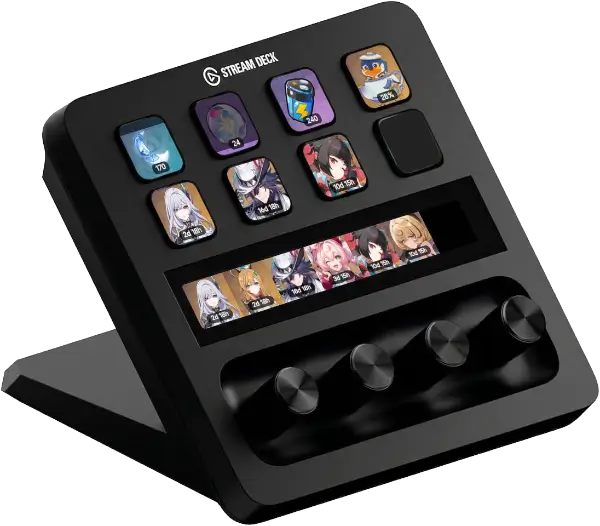
HoYo Deck
HoYoverse game utilities for Stream Deck
Actions
Supported Games
Each game has dedicated actions tailored to its unique mechanics. Configure them per account and track everything in real time.


Genshin Impact
Monitor your Original Resin, daily commissions, expeditions, Serenitea Pot, endgame progress, and current banners — never miss a resin cap again.
Resin
Animated fill gauge showing your current Original Resin with visual fill level and count badge.
Commissions
Daily commission progress tracker with an animated mascot that blinks and floats across three visual states.
Expeditions
Character avatar display showing all active expeditions with completion status and live countdown timers.
Teapot
Serenitea Pot realm currency shown as a percentage with a floating Tubby animation and max coin alert.
Transformer
Parametric Transformer cooldown timer with ready state indicator. Supports icon and text display styles.
Endgame
Track Spiral Abyss, Imaginarium Theater, and Stygian Onslaught progress with star counts and reset timers.
Banner
Current wish banner with 5-star character or weapon icon, countdown badge, and animated blink effect.
Honkai: Star Rail
Keep an eye on your Trailblaze Power, endgame challenges, and current warp banners at a glance.
Trailblaze Power
Animated fill gauge showing your current Trailblaze Power with visual fill level and count badge.
Endgame
Track Memory of Chaos, Pure Fiction, Apocalyptic Shadow, and Anomaly Arbitration with star counts and timers.
Banner
Current warp banner with 5-star character or Light Cone icon, countdown badge, and blink animation.
Zenless Zone Zero
Track your Battery Charge, endgame challenges, and Signal Search banners directly from your desk.
Battery Charge
Animated fill gauge showing your current Battery Charge with visual fill level and count badge.
Endgame
Track Shiyu Defense and Deadly Assault progress with star counts and season reset timers.
Banner
Current Signal Search banner with S-rank character or W-Engine icon, countdown badge, and blink animation.


Cross-Game
Works Across All Games
These actions support Genshin Impact, Honkai: Star Rail, and Zenless Zone Zero. Pick your game in settings and you're ready.
Daily Reward
Shows today's HoYoLAB check-in reward with a preview of the item. Tap to claim it directly from your Stream Deck.
Redeem Code
Automatically detects and redeems all available promo codes for your account with live progress tracking.
Stamina Overview
Multi-game stamina overview for your Stream Deck+ encoder. Shows up to three games side-by-side with rotate to focus and tap to refresh.
Wish Tracker
Manual pity counter for all games on the encoder. Rotate to increment, press for +10, and tap the display to switch game or reset.
Patch Countdown
Multi-game version countdown showing time remaining until each game's next patch. Configure up to three game slots with color-coded badges.
Getting Started
Set Up in Minutes
Four steps and you're live. No manual cookie extraction — the plugin handles authentication through a secure login window.
Install from the Marketplace
Download HoYo Deck from the Elgato Marketplace. It's free and installs in seconds.
Log in with HoYoLAB
Open any action's settings and log in through the built-in HoYoLAB webview. Your credentials stay local on your machine.
Enable Real-Time Notes
Go to HoYoLAB → Settings and enable the "Real-Time Notes" switch for each game you play. This allows the plugin to read your in-game data like stamina, commissions, and expeditions.
Add actions to your deck
Drag and drop actions onto your Stream Deck layout. Configure each action to your account and preferred game. Data refreshes automatically.